About the Client & Upwork Inc. Platform
My role: Freelance User Experience & Interface Designer
Client: Upwork Inc. Client
Duration: 06/15/2022 - 08/25/2022 (2 months)
The client was an individual, an accomplished young professional with
a background in engineering, project management, and entrepreneurship based in Zurich, Switzerland.
This collaboration was facilitated through the Upwork Inc. platform,
a reputable environment that fosters connections between freelance professionals and clients.
By the end of this project, the client hired me again for his next startup project that involved his partner who is a graduate of London Business School in London, the United Kingdom through which he found the user research participants, professionals in the engineering field.

PROJECT DETAILS
PERSONAL CABINET FOR ZURICH RESIDENTS
USER EXPERIENCE & INTERFACE DESIGN
OVERVIEW
The platform empowers residents to report incidents, such as a broken window, facilitating efficient communication with the relevant authorities to promptly address and resolve identified issues.
In my role as a freelance User Experience and Interface Designer, I took active ownership and responsibility for the comprehensive research and design of the website aimed at addressing the needs of Zurich city residents in Switzerland encountering issues with their residential units.
My client was a Project Manager, playing a pivotal role in facilitating the entire process. This involved providing well-defined deadlines and organizing weekly virtual meetings to discuss the project details in depth.
This collaborative approach ensured a streamlined and effective workflow throughout the research and design phases.
User Research
Interface Design
Collaborative
Approach
Weekly Virtual Meetings
with Client
Effective Workflow
OBJECTIVE
The aim was to understand the challenges individuals faced in managing their apartments during emergencies and minor issues in Zurich.
This involved exploring frustrations related to both minor inconveniences and serious problems, with the goal of identifying these issues to develop effective solutions.
METHODOLOGY
The main methodologies used in the research phase were:
a survey in Qualtrics which is an online tool that allows to create, distribute and analyze surveys.
competitive audit
Competitive Audit
1
USER EXPERIENCE DESIGN PROCESS
To enhance communication with the client, I developed an extensive User Experience Design Process, carefully illustrated in the diagram below.
Phase II: Design
Prototype
Low-fidelity
Create Digital Low-fidelity Wireframes
Create Prototypes
Prototype
High-fidelity
Create Digital High-fidelity Wireframes
Create Prototypes
Phase I: User Research
Empathize
Define research goals
Conduct Survey & Collect Data
Do a competitive audit
Create Personas
Create User Stories
Create a User Journey Map
Define
Define user needs & problem statements
Build a Hypothesis Statement
Define Value Proposition
Ideate
Build a Goal Statement
Outline User Flow
Create Big Picture & Close-up Storyboards
EMPATHIZE: JOURNEY MAP
In accordance with the findings derived from user research (survey and cometitive audit), I successfully formulated a comprehensive journey map.
Persona: Robert
Goal: An easy and quick way to get help to solve simple or larger-scale problems in his apartment.
TASK LIST
Find out if the building where they live has an app or a website.
Access the service either through web or mobile app.
Browse the service list.
Select the needed service from the list.
Look at the service information (what service they chose, when the service will be provided, how much will it cost, etc.).
Confirm the service.
See in which step the service is by tracking the steps of service (e.g., the key is being prepared, the key is ready for pick up in your post box, etc.).
Receive the service fully
Inspect the service
Confirm that the service was provided successfully and leave feedback.
Make a request online.
FEELING ADJECTIVE
Overwhelmed by the process of finding the right website.
Excited that they can solve their problems if they find the right platform/website.
Happy that they found the right platform
Happy to see the platform that can solve the problem
Annoyed at small size of text with little to no visuals.
Convenient and comfortable feeling of requesting the service online quickly.
Happy that the process of sending a request is quick and easy.
Anxious and confused about having to wait or not knowing how long to wait for until the problem is solved.
Frustrated at not being able to track the service.
Annoyed at receiving the service late or when it is no longer needed.
Happy to receive the service without spending time on going to the building management office physically.
Grateful to receive the contacts of who to call during emergency.
Relieved that the problem was solved.


IMPROVEMENT
OPPORTUNITIES
Create a website that could provide services such as reporting of kitchen stove damage, lost key, change of name, flood, who to contact in case of emergency, events in the community, etc.
Provide images.
Optimize the website for screen reader technologies or provide a function that allows making the text bigger.
Provide options to save the details of the request (e.g., send e-mail with the details of the request).
Allow users to create an account and track the service.
Let users to create an account and see the history of services provided earlier.
Provide an option to track the service.
Provide options to choose express-services for additional payment.
Send a notification e-mail of the service being fully resolved.
Find an online platform that provides services
(e.g., report damaged stove in the kitchen, lost key, etc.)
Browse the service options and find the one which is needed now (e.g., lost key)
Complete the request
Track the request status
Receive Service
Make a request on the chosen service
Actions


In this stage, our approach involves generating innovative ideas through activities such as "Crazy Eights", "How Might We's" and “Story Boards.” This ideation phase serves as a crucial foundation for shaping design solutions.
The main tools used in this phase were:
crazy eights
how might we’s
story boards (big picture and close-up)
IDEATE
DEFINE: VALUE PROPOSITION
Following the findings derived from research, I successfully formulated a comprehensive value proposition that explains why a consumer should use our product or service.
Value propositions ensure that users have a reason to use the product that we are creating, as opposed to any other product currently available.
The main reasons users will be interested and willing to engage with our product are illustrated below in 4 steps.
Step 2. Explanation of the value of the product.
Accessable
Safe
Professional Experience
Cost Efficient
Provides contact information of a responsible body for a specific problem
Provides information on building rules and regulations to ensure safety
Easy-to-use app and web design
No hidden fees
People can fix the problem themselves and report about it by uploading pictures before and after
Allows to access important, personal with private data documents safely
Tracking of the service
Allows to make online payments for services - parking, laundry, gym, etc) making the process smooth and easy
Notification e-mail that can be sent to the user to allow better service
Provides services to both landlords and tenants
Provides information on community events
Allows to access to important documents with safety
People can report a specific problem or incident
Step 3. Connection between the features and benefits with the needs of the users.
Step 4. Our value proposition list.
We narrowed our list down to the benefits and features that match user needs. Below is the review of the list of value propositions our product offers:
Efficient report system for effective troubleshooting
Easy access to the contact details of responsible bodies
Information on community events, pet allowance, gym, laundry rooms, etc.
More freedom and flexibility for the residents
Better communication system between the residents and building managers
Fara
Fara is provided with information on community events
Fara can check if she is allowed to have a pet(s) in her apartment.
Fara can apply and get permission for having a pet(s) in her apartment.
Fara can report about her new pet adoption online and let her building management know about her new family member.
Robert
Robert can report a specific problem or incident in his apartment even if he is not at his home
Robert is provided with the contact information of a responsible body for a specific problem and he can contact the right person immediately and get helped
Jessa
Jessa can fix the problem on her own and report it to the building management by uploading pictures before and after
Step 1. Description of possible features and benefits of the product.
Provides contact information of a responsible body for a specific problem
Tracking of the service
Provides services to residents, home-owners and property management companies
Parking information - access, fee prices, etc.
Allows residents to check if they can have a pet(s). If yes, then they can apply for permission online.
Allows residents to report about their new pet adoption situation.
Notification e-mail that can be sent to the user to allow better service
Landlords can find contact information of their tenants
Provides information on building rules and regulations to ensure safety
Laundry - hours of work, if the washing machines are broken, etc.
Allows to access important documents safely
Gym - hours of work and how to access, if the equipments are in good condition, etc.
People can report a specific problem or incident
People can fix the problem themselves and report about it by uploading pictures before and after
Provides information on community events
No hidden fees
Allows to make payments for certain services - parking, laundry services, gym, etc).
Allows to chat online (bot/forum)
Easy-to-use app and web design
IDEATE: STORY BOARDS
The storyboards presented below vividly illustrate various challenges that users may encounter in their apartment living, such as loosing keys. With the introduction of our dedicated residents' portal, individuals will have a streamlined solution to address these issues, significantly enhancing their day-to-day experiences in a positive and impactful manner.


IDEATE: USER FLOW
The flow below shows the path for the users who can access their personal cabinet, where they can submit requests directly to the responsible stakeholder, ensuring a swift and streamlined process for addressing their concerns related to their apartment issues.

DESIGN: LOW-FIDELITY PROTOTYPING
Following the completion of research, I developed a low-fidelity prototype, which serves as a basic representation of an early-stage design concept. This prototype was instrumental in swiftly testing ideas, pinpointing potential shortcomings, and eliminating design iterations that did not align with user preferences.





DESIGN: HIGH-FIDELITY PROTOTYPING
PERSONAL CABINET FOR ZURICH RESIDENTS
INTERFACE DESIGN IN HIGH FIDELITY

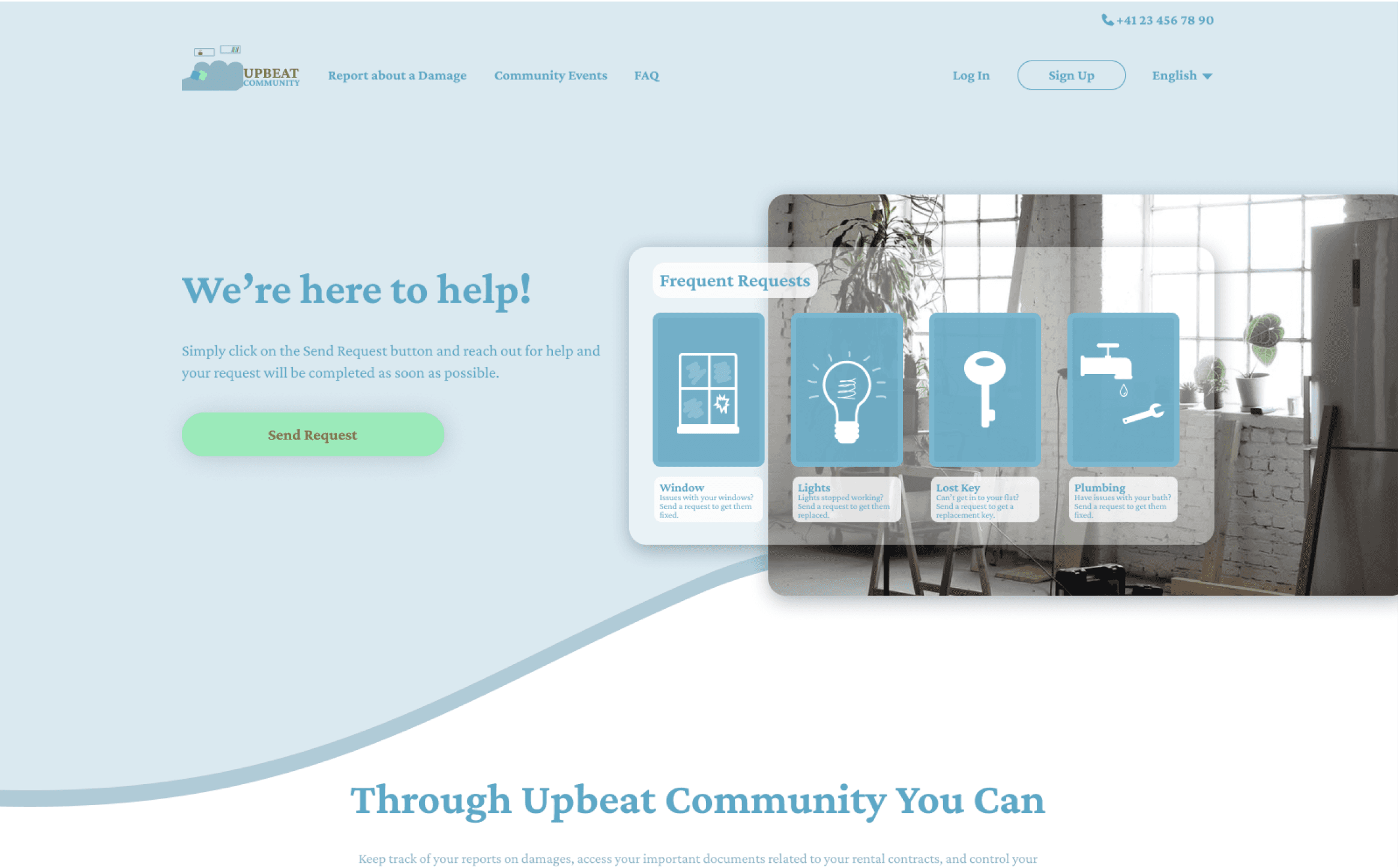
A website where Zurich residents can send requests instantly to the responsible bodies when they have problems in their apartments
A shortcut to frequent requests such as issues with lighting or plumbing, lost key to their apartment and broken window.
A website where users can access various services, report problems, and get help on time. All of that gives them more control and freedom over their living spaces making them feel more comfortable and happier.
Residents stay informed about the events that are happening in the neighborhood. For example, a dog walking event where the residents meet each other and spend a good time playing with their dogs exchanging positive emotions.
HOMEPAGE

Zurich residents can have various issues regarding their residential buildings starting from damaged windows to lost keys. After conducting research and communicating the results with my client, we identified the most necessary services that should be included on the website.
They are:
general requests
damage reports
finance-related requests
documents (e.g., request a copy of the lease contract)
apply for a sublease
apply for permission to have a roommate or a pet
apply for a name tag replacement for the postal box
ask questions about the bill payments
change bank details
order a new key.
Users can send a quick online request and solve problems even if they are not at home.
All they have to do is to choose the kind of request they need, proceed to the next steps and send the request online.
OUTCOMES
Through the newly developed website, users can effortlessly submit requests whenever they encounter challenges with their apartments, such as a broken window or lost keys. This significantly enhances the convenience of residents' lives in Zurich, as the platform is easily accessible and ensures a secure environment. Every user has the option to create an account, ensuring that their data is securely stored within their personal cabinets, thereby contributing to a positive and seamless user experience.
LEARNINGS
Since this was my first ever freelance project, I encountered the challenge of not fully understanding the project's scope and the time required for completion. Fortunately, my client, who proved to have effective project manager skills, established specific deadlines for each task through a structured table. Upon sharing the User Experience Design Process diagram I had crafted, my client promptly translated it into a well-defined timetable. We also instituted weekly meetings to monitor our progress, contributing significantly to the project's success. Nevertheless, I recognized the need to improve my ability to accurately estimate project timelines, taking into account the workload associated with similar projects for future planning.
Furthermore, in retrospect, I acknowledge the potential benefits of incorporating Usability Testing before engaging in high-fidelity prototyping. Given the unique circumstances of this being my first project with tight deadlines, my client and I mutually agreed to forego testing. Moving forward, I value the importance of integrating testing methodologies, even under time constraints, to enhance the overall quality and effectiveness of future projects.
WHAT FREELANCE EMPLOYERS ARE SAYING ABOUT AIZHAN
CAREFUL, ACTIVE, ORGANIZED AND WELL-PREPARED
Aizhan provided a great research on our clients,
users and the competitors. She has carefully prepared,
actively participated and thoroughly evaluated interviews with C-level executives. With the help of personas, storyboards and hypothesis we were able to create empathy with the users, identify their biggest pain points and generate deep insights. Based on the research Aizhan designed a solution consisting of low-fidelity and
high-fidelity wireframes that met the users wants and needs. Aizhan was very well organized, always showed up to the meetings, was well prepared and on time.That is why I can confidently recommend Aizhan to other people too.
December 13, 2022
A GREAT COMMUNICATOR AND CREATIVE LEADER
Aizhan is a great UX designer, communicator and creative leader. She guided us through the whole design process, helped us to build empathy with our users and to work out
a clear problem statement. Her research results and competitive analysis helped us to stay focused and really payed off at the second phase of the project, where Aizhan designed excellent low-fiedlity and high-fidelity wireframes and prototypes. In the end she handed off a perfectly organized and documented Figma project that the developers could easily access and comprehend. This is why we are looking forward to start our next project with Aizhan
in the next few days.
August 25, 2022
January 2024
Aika Aliyeva

As a dynamic User Experience Designer,
I'm to craft extraordinary design solutions just for you!
FREELANCE WORK TWO
ENGINEERING STARTUP COMPANY WEBSITE
USER EXPERIENCE & INTERFACE DESIGN
My role: Freelance User Experience & Interface Designer
Client: Upwork Inc. Client
Duration: 08/26/2022 - 12/13/2022 (4 months)
About the Client
The clients were an accomplished young professional with a background
in engineering, project management, and entrepreneurship based in Zurich, Switzerland and his partner, an MBA graduate student from
London School of Business in London, the UK.
Coming Soon...

SEND REQUEST PROCESS
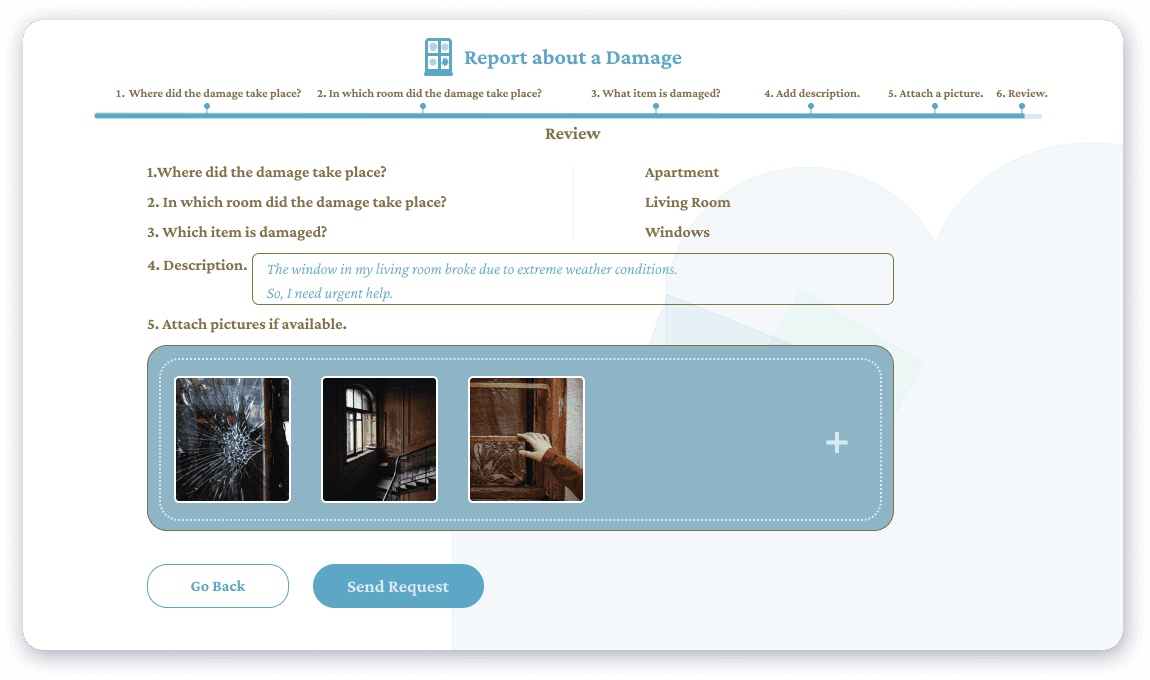
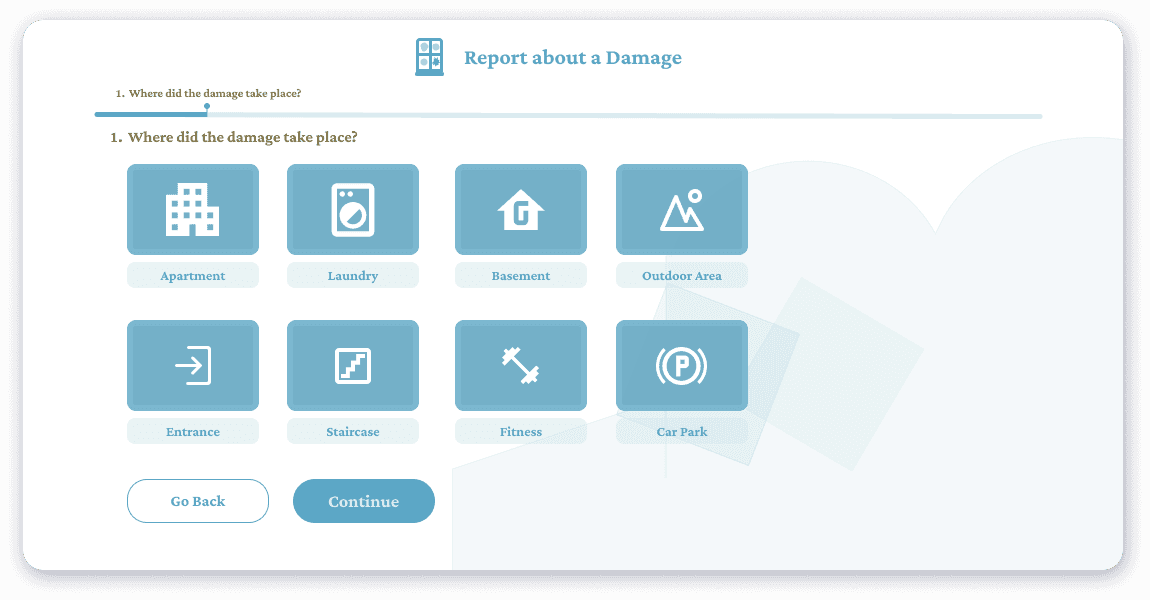
Explore the simple steps for reporting any issues within the Zurich residential building. The images illustrate how effortlessly users can report damages in a specific area. They just have to choose the location of the damage, like an apartment, and with a quick click on the "continue" button, they can send a request for the responsible authorities to address the problem promptly.
1
Report a damage/problem in the apartment
Effortlessly choose which exactly item got damaged and click on the continue button.
3
What item is damaged and needs to be fixed?
Type a few quick sentences explaining what happened if you wish, so the help can be provided as fast as possible.
4
Add description explaining what happened
Provide pictures of the damage so the experts can have a better idea on how to solve the problem.
5
Attach pictures if necessary
Review the information before sending the request to avoid any mistakes and errors.
6
Review
🎉 Yeeey, the request was sent successfully and the help is on its way!
7
Send the request
Simply choose where the damage took a place in the apartment. One example could be the living room.
2
In which room did the damage take place?